Thursday, August 25, 2022
When it comes to Carestream CR processers, there are a number of reasons why the screens or cassettes may become jammed in the processor. One way you can help to reduce the probability of a jam, is to follow our top tips as outlined below...
- Using two (2) hands, insert the cassette into the centre of the tray slot. Paying attention to the arrows in the red box, align the orange arrow on cassette with the red arrow on Vita Flex scanner, as shown in Figure 1
NOTE: Align the arrows in the red box as shown in the image below.
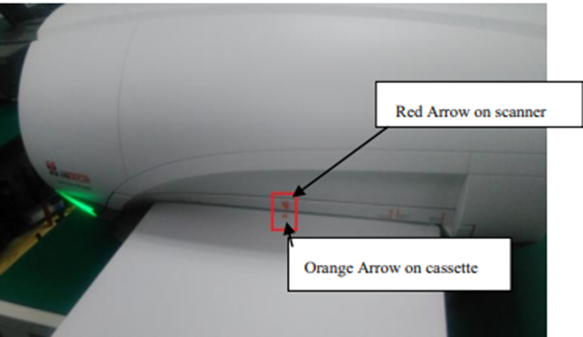
Figure 1
- Gently push the end of the cassette horizontally into the card slot with two hands until you feel the slight resistance of the cassette touching the locking teeth, as shown in Figure 2
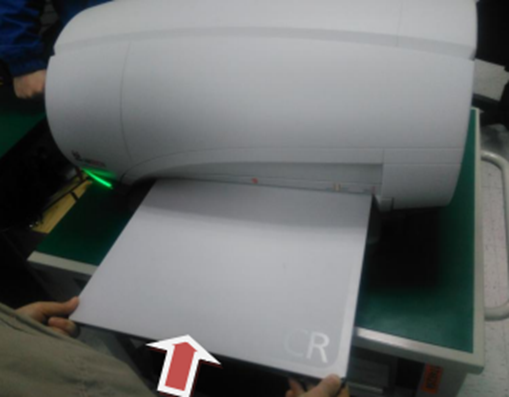
Figure 2
NOTE: Please lift the end of the cassette slightly when you insert the cassette, this will help to keep the front of the cassette in the right position.
- Hold the back of the machine with one hand to keep the machine stable. Using the opposite hand, slightly lift up the end of cassette while continuing to insert the cassette into the tray slot until you heard the locking teeth click the cassette into position. The audible click indicates the cassette has been locked by locking teeth. Steps are illustrated in Figure 3.
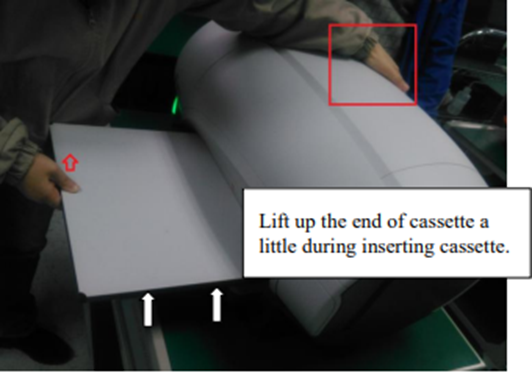 Figure 3
Or, why not switch to DR and avoid these problems altogether?
View our full list of X-ray processors >>
We hope you enjoyed this blog post!


Don't forget to share! 👇